JobCostKit › Free tool
Free Markup vs Margin Calculator
Add 20% to your costs and you'd think you made 20%. You didn't: you kept 16.7% of the price. This free spreadsheet shows the real numbers on any job, and tells you the markup you need to cover your overhead and still make money.
Free download. One spreadsheet that opens in Excel, Google Sheets or LibreOffice. No macros.
Download it freeThe download is handled by Polar, our checkout provider. It asks for your email so it can send you the download link. You won't be charged.
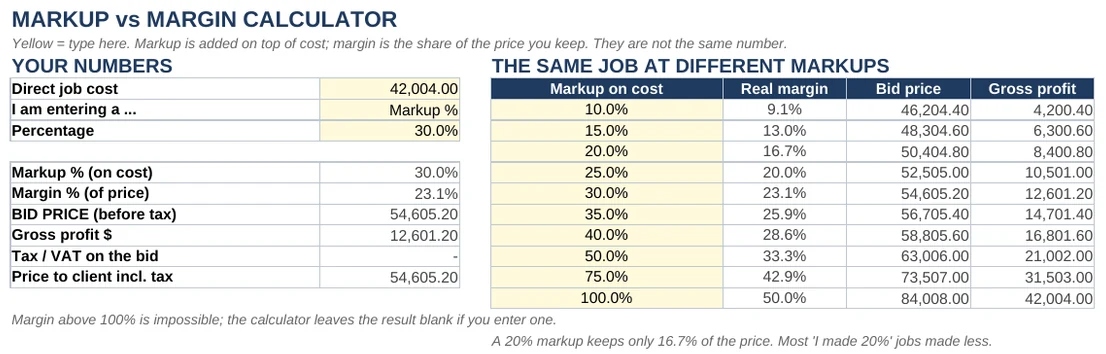
The Calculator sheet with the sample job filled in.
What it does
- Shows the real margin. Type your job's direct cost and the markup you add. You get the bid price, your gross profit in dollars, and the margin you actually keep.
- Works backwards from a margin. Know you want to keep 20%? Set "I am entering a ..." to Margin % and it tells you the bid price and the markup that gets you there (25%, not 20%).
- Compares markups side by side. A table shows the same job at markups from 10% to 100%, with the margin, bid price and profit for each.
- Checks your overhead. The Overhead Recovery sheet takes your yearly overhead (vehicles, insurance, phone, rent, even your own salary) and expected yearly job costs, and works out the lowest markup that covers them and still leaves a profit.
How to use it
- Open the file and go to the Calculator sheet. Yellow cells are the ones you type in; everything else works itself out.
- Enter the job's direct cost: materials, labour, subcontractors and equipment.
- Pick whether you're entering a markup or a margin, and type the percentage. Read off the bid price and profit.
- Once, with last year's figures, fill in Overhead Recovery to find your minimum markup. Use it as your floor on every bid.
Set your currency and tax rate on the Start Here sheet; it works in dollars, pounds, euros or anything else. To use it in Google Sheets, choose File → Import → Upload and pick "Replace spreadsheet".
Ready to try it on your next bid?
Download it freeWant to understand the maths?
Read Markup vs margin for contractors: the two formulas, a worked $40,000 example, and how to find the markup that covers your overhead.